Announcing Apache Teaclave™ (incubating) 0.4.0

Mingshen Sun

On behalf of the Teaclave community, I am happy to announce the fourth Apache Incubator release of Teaclave, 0.4.0. Teaclave is a universal secure computing platform, making computation on privacy-sensitive data safe and simple. Apache Teaclave™ (including the FaaS platform, SGX SDK, and TrustZone SDK) is being used and contributed by developers from many organizations and other open source projects. Please see the powered by page to learn more.

In this release, we mainly focus on better user management, task management, performance improvement and stability.

Highlights

In this release, we introduce a role-based access control for user management. Specifically, we define roles like admin, function owner, data owner, data owner manager, etc. Additionally, we also add APIs to support user management functionalities. In addition, we also implement a feature to cancel a running task to kill a long-run function which is no longer needed. Besides these two new features, we also made a lot of underlying changes to improve the performance of RPC and stability of the secure database.

To learn more, here is a list of notable changes in Teaclave version 0.4.0.

Features

  • Add the DisableFunction interface (#620)
  • Better user management interfaces: add the UserUpdate, UserChangePassword, ResetUserPassword, DeleteUser, and ListUsers interfaces
  • Support optional input/output files (#603)
  • Start Teaclave docker services with auto-detection mechanism (#559)
  • Add watchdog functionality to monitor service status (#600)
  • Support cancel a task
  • Support intermediate cert in DCAP attestation cert

Enhancements

  • Better error handling in Python client SDK (#632)
  • Refactor services error types and messages, make them readable to end users
  • Optimize RPC memory footprint of serde (#577)
  • Support selectively including executors (#574)
  • Support AES-GCM output files (#629)
  • Add port probe for service launching
  • Update WAMR version to WAMR-01-18-2022 (#616)
  • Move execution context into a separate crate (#598)
  • Support Ubuntu 20.04 docker image and add corresponding CI pipelines
  • Persistent MockDB in test mode (#580)

Bug Fixes

  • Better task state error and fix cancel error issue in the example (#637)
  • Fix privilege issues in the GetFunction and ListFunctions interfaces (#636)
  • Better building system: fix packages rebuild every time, avoid issues in parallel make (#589, #596)
  • Fix the issue of generating code coverage of tests (#627)
  • Fix LevelDB assertion issue: leveldb lru bug, using disk db for unit test (#583)

Docs

Download

Teaclave 0.4.0 can be downloaded at the download page. Note that it is essential to verify the integrity of the downloaded file using the PGP signature (the .asc file) or a hash (the .sha256 file).

Documentation

If it is the first time to try Teaclave, we provide a simple but clear tutorial to guide you getting stated with Teaclave by invoking your first function in Teaclave.

Basically, you can build the Teaclave platform using docker with these commands:

$ tar zxvf apache-teaclave-0.4.0-incubating.tar.gz && cd \
apache-teaclave-0.4.0-incubating
$ # Instructions to verify the source tar: https://teaclave.apache.org/download/#verify-the-integrity-of-the-files

$ docker run --rm -v $(pwd):/teaclave -w /teaclave \
-it teaclave/teaclave-build-ubuntu-1804-sgx-2.14:latest \
bash -c ". /root/.cargo/env && \
. /opt/sgxsdk/environment && \
mkdir -p build && cd build && \
cmake -DTEST_MODE=ON -DSGX_SIM_MODE=ON -DGIT_SUBMODULE=OFF .. && \
make"

Launch all services with docker-compose using simulation mode:

$ (cd docker && docker-compose -f docker-compose-ubuntu-1804-sgx-sim-mode.yml up --build)

And invoke function with a Python client:

$ cd examples/python
$ PYTHONPATH=../../sdk/python python3 builtin_echo.py 'Hello, Teaclave!'
[+] registering user
[+] login
[+] registering function
[+] creating task
[+] approving task
[+] invoking task
[+] getting result
[+] done
[+] function return: b'Hello, Teaclave!'

If you want to understand the internals of Teaclave, we provide several documents about the design of Teaclave. Also, we extensively document our codebase in each sub directories. At last, API references are automatically generated and uploaded to our homepage.

Community

Announcing Apache Teaclave™ TrustZone SDK (incubating) 0.2.0

Mingshen Sun

On behalf of the Teaclave community, I am happy to announce the release of Teaclave TrustZone SDK 0.2.0.

Teaclave TrustZone SDK provides abilities to build safe TrustZone applications in Rust. The SDK is based on the OP-TEE project which follows GlobalPlatform TEE specifications and provides ergonomic APIs. In addition, it enables capability to write TrustZone applications with Rust's standard library and many third-party libraries (i.e., crates). Teaclave TrustZone SDK is a sub-project of Apache Teaclave™ (incubating). To learn more about the design and history of TrustZone SDK, please read the blog Welcome Rust OP-TEE TrustZone SDK To Teaclave.

This is the second Apache Incubator release of Teaclave TrustZone SDK. Teaclave TrustZone SDK provides abilities to build safe TrustZone applications in Rust. The SDK is based on the OP-TEE project which follows GlobalPlatform TEE specifications and provides ergonomic APIs. In addition, it enables the capability to write TrustZone applications with Rust's standard library and many third-party libraries (i.e., crates). Teaclave TrustZone SDK is a sub-project of Apache Teaclave™ (incubating).

During this period, we are working closely with the OP-TEE community to integrate TA examples written in Rust into the upstream repository. You can try and play with the examples written in Rust with Teaclave TrustZone SDK since the OP-TEE 3.15.0 release.

More specifically, in this release we have the following updates:

Features

  • Add support for tee-supplicant loadable plugins and examples
  • Add TEE Socket APIs and examples

Enhancements

Integration into OP-TEE

  • Add the -rs suffix to examples and update test scripts (#34)
  • Update to OP-TEE 3.14.0 (#35)
  • Update to OP-TEE 3.16.0 (#59)

Building

  • Upgrade building docker to Ubuntu 20.04 (#33)
  • Update Rust toolchain to nightly-2021-09-20 and std to 1.56.1 (#53)
  • Add setup.sh to setup rust environment and initialize submodules (#40, #63)

CI

  • Switch to GitHub Actions (#33)
  • Add expect script for OP-TEE CI and fix CI errors (#45, #50)

Bug fixes

  • Fix ldelf error of arm32 ta (#38)
  • fix error when making the plugin example second time (#42)
  • Correct toolchain PATH env (#44)

Docs

  • Add debugging OP-TEE TA doc: Debugging OP-TEE TA
  • Add documentation of Rust examples: Overview of OP-TEE Rust Examples
  • Polish the getting started documentation

Download

You can download the release from the download page. Also, please checkout our repository hosted on GitHub.

Contributing

Teaclave TrustZone SDK is under the Apache License v2 and open source in The Apache Way. We aim to create a project that is maintained and owned by the community. All kinds of contributions are welcome. Thanks to our contributors.

Teaclave Meetup #11

Mingshen Sun

Agenda

  • Recent Updates on Teaclave - Mingshen Sun (10m)
  • HyperEnclave - Shuang Liu (40m)
  • Free discussion (10m)

Attendees

  • Mingshen Sun
  • Ran Duan
  • He Sun
  • Weijie Liu
  • Shuang Liu
  • Bing Duan

Group Photo

Group Photo

Teaclave Meetup #10

Mingshen Sun

Agenda

  • Recent Updates on Teaclave - Mingshen Sun (15m)
  • Proof of Being Forgotten: Verified Privacy Protection in Confidential Computing Platform - Hongbo Chen (30m)
  • Free discussion (15m)

Notes

Teaclave Recent Updates

  • Teaclave FaaS
    • Optimize RPC memory footprint of serde
    • Server error refactoring
    • Executor watchdog
    • Task canceling
    • APIs: list_users, delete_user, reset_user, user_change_password, disable_function
    • Optional input/output files
  • Teaclave TrustZone SDK
    • Update to OP-TEE 3.16.0 (no breaking change)
  • GSoC 2022 call for participation
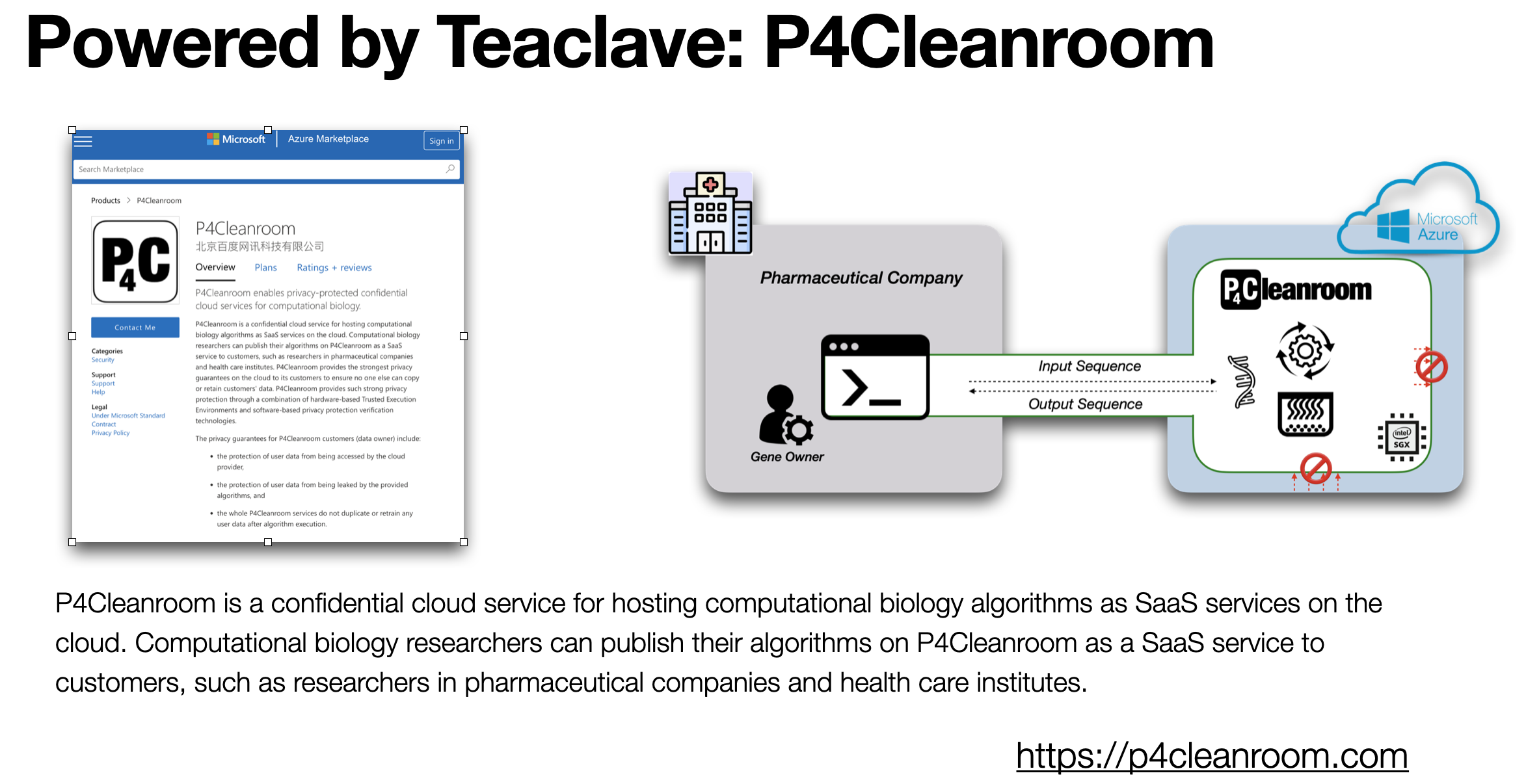
  • Powered by Teaclave - P4Cleanroom: P4Cleanroom is a confidential cloud service for hosting computational biology algorithms as SaaS services on the cloud. Computational biology researchers can publish their algorithms on P4Cleanroom as a SaaS service to customers, such as researchers in pharmaceutical companies and health care institutes.

P4Cleanroom - Powered by Teclave

Proof of Being Forgotten

The talk is same with the recent talk on OC3. Video can be found at:

Q&A during the talk:

Gary: Assumption on reusing TEE sandbox?

Hongbo: No, if not reuse TEE, still has leakage.

Gary: What is Zone, is it heap?

Hongbo: No only. E.g., secrets in stack and also in general purpose registers.

Gary: How to demonstrate/show the Proof of Being Forgotten? Attestation? Enclave hash?

Mingshen: PoBF is a statically verified property. We also consider to add dynamic traces for post-mortem auditing. Combined with the enclave hash and reproducible build, we can provide the proof before the execution statically, and after the execution dynamically.

Topic for the Next Meetup

  • HyperEnclave in Ant Finance - Shuang Liu

Attendees

  • Hongbo Chen
  • Gary
  • Ran Duan
  • He Sun
  • Ruide Zhang
  • Weijie Liu
  • Chan Zhao

Teaclave Meetup #9

Mingshen Sun

Agenda

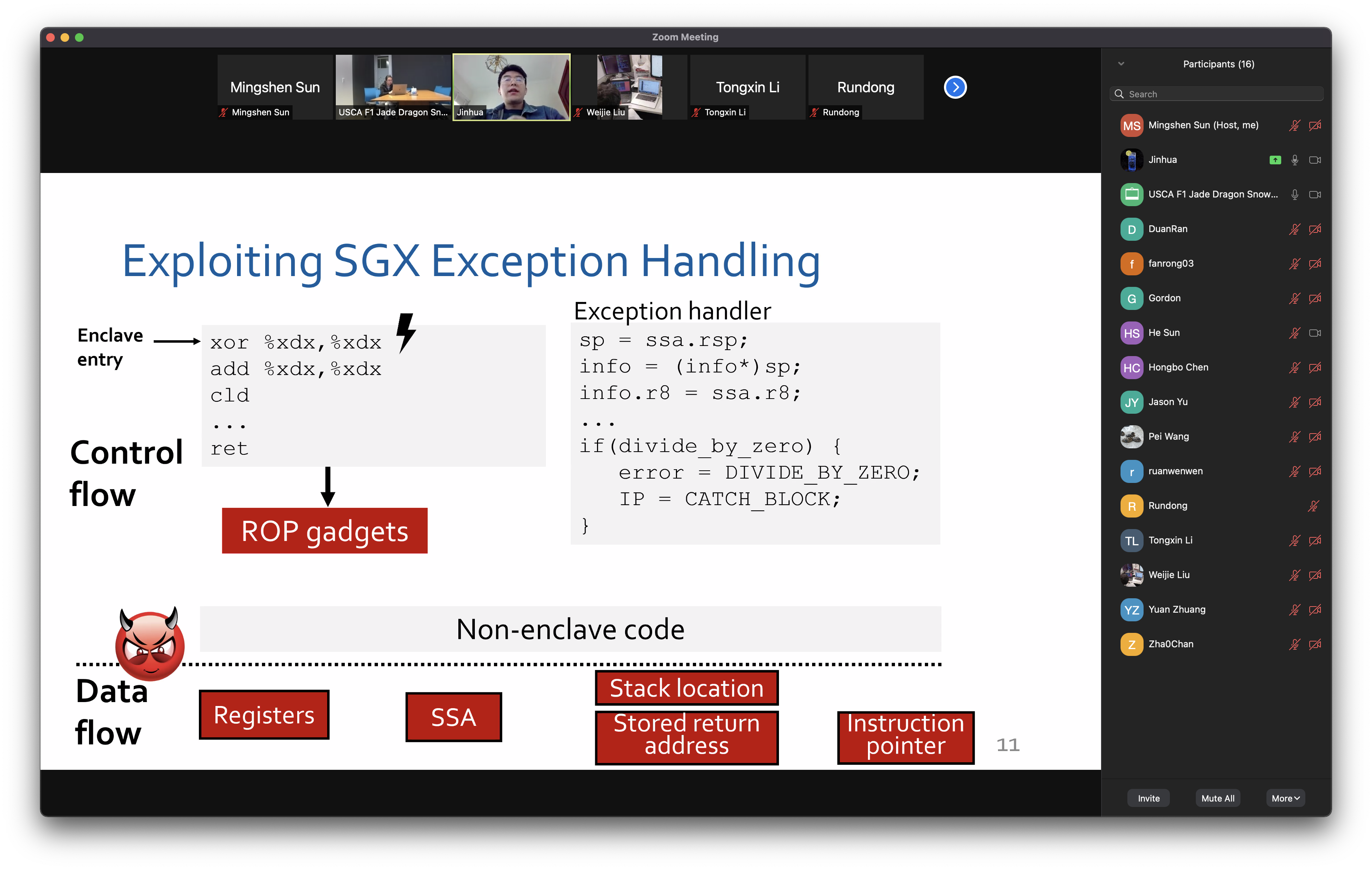
  • SmashEx: Smashing SGX Enclaves Using Exceptions — Jinhua Cui

Notes

Attendees

  • Jinghua
  • Ran Duan
  • Rong Fan
  • Gordon
  • He Sun
  • Hongbo Chen
  • Jason Yu
  • Pei Wang
  • ruanwenwen
  • Rundong
  • Tongxin Li
  • Weijie Liu
  • Yuan Zhuang
  • Zha0Chan
  • Mingshen Sun

Group Photo

Group Photo

Security Advisory of SmashEx and CVE-2021-0186

Mingshen Sun

Recently, we were notified of a re-entrancy vulnerability in the exception handling designs of some popular SGX SDKs (including Intel SGX SDK), resulting in arbitrary disclosure of enclave private memory and code-reuse attacks in SGX enclave.

The vulnerability is named as SmashEx [1]. The SmashEx attack affects several SGX runtimes with exception handling. For Intel SGX SDK, the assigned identifier is CVE-2021-0186 [2]. While the vulnerability itself is not a Teaclave flaw, we're taking proactive measures to explain and mitigate its impact on Teaclave users.

Overview

Due to the lack of atomicity primitives in SGX enclaves, an SGX enclave can be interrupted and re-entered at any time, including when it is in a state unsafe for re-entry (i.e., when it is executing a critical section). The SmashEx attack exploits such unsafe enclave re-entries happening in the exception handling mechanism in the SGX runtime.

A malicious host can create an exception immediately after EENTER which causes control to be transferred to the host before the enclave stack (RSP register) has been properly set up. Then, a special ECALL (called ECMD_EXCEPT) to enclave will use the attacker-controlled RSP register to setup the context of the exception handler function. At last, when the host transfers control back to the enclave with ERESUME, it may execute with a stack that resides in host memory thereby enabling ROP exploits.

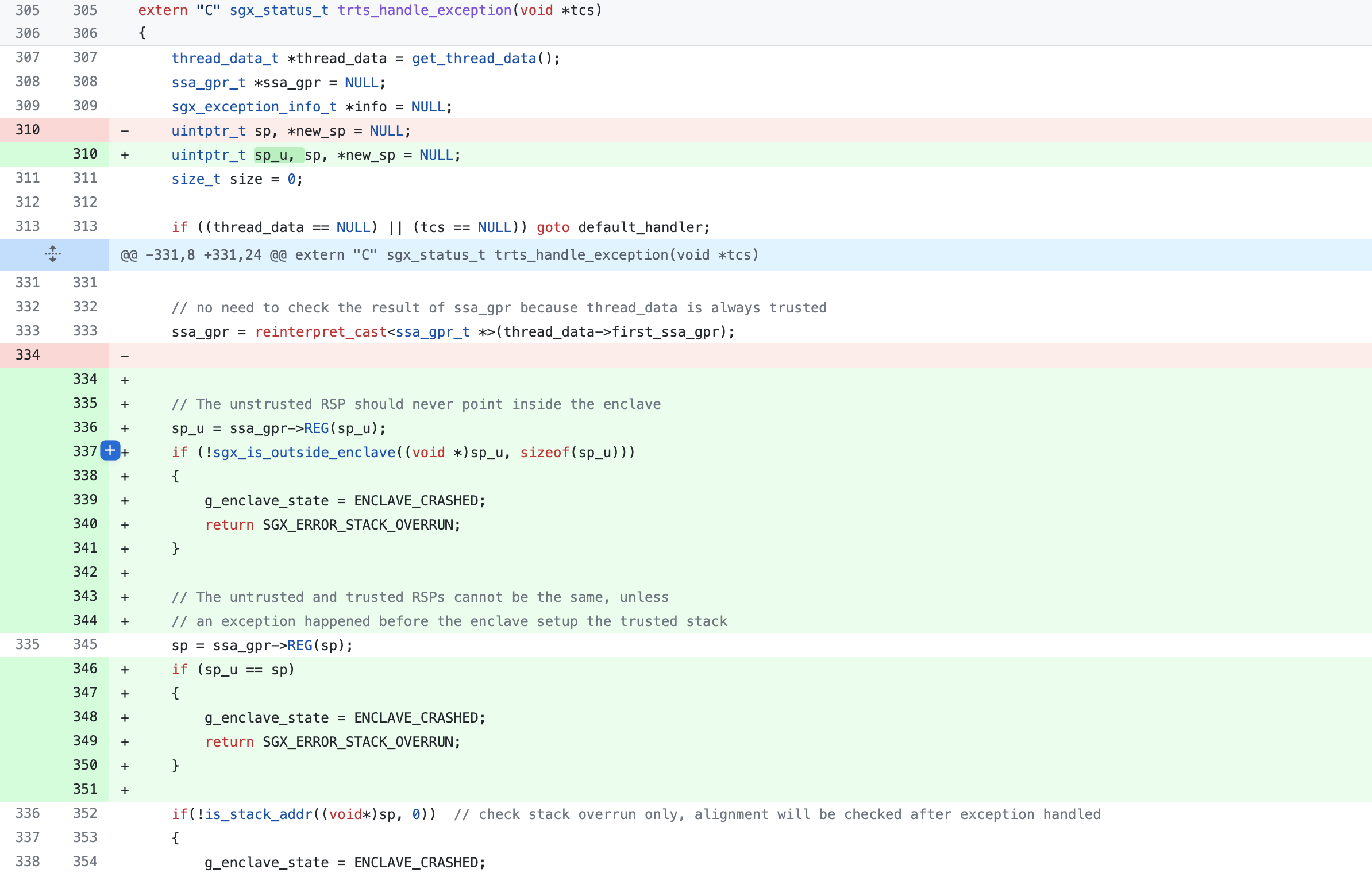
This vulnerability can be fixed by adding extra checks on untrusted RSP when constructing the context of the exception handler.

Affected Versions

For Intel SGX SDK, the vulnerability affects all projects using the following versions.

  • Intel SGX SDK for Windows v2.12 and erlier
  • Intel SGX SDK for Linux v2.13 and earlier

Impacts on Teaclave

Teaclave SGX SDK wraps Intel SGX SDK and provides a Rust development environment. The affected Intel SGX SDK version was recommended in Rust SGX SDK v1.1.3 (which is a pre-Apache release). Therefore, people using Rust SGX SDK v1.1.3 with the vulnerable Intel SGX SDK (v2.13 and earlier) are also vulnerable. However, the current Teaclave SGX SDK is compatible with newer Intel SGX SDK versions. Therefore, we recommend all users to upgrade to the latest Intel SGX SDK.

For Teaclave (i.e., the Teaclave FaaS platform), it uses Teaclave SGX SDK to build a confidential computing platform. Therefore, the Teaclave v0.2.0 released in March used the vulnerable Intel SGX SDK version. However, the v0.3.0 released [3] in August has upgraded the Intel SGX SDK to v2.14 with the fix. Therefore, the latest release of Teaclave is not affected by this vulnerability.

Patches & Mitigations

The vulnerability has been fixed in Intel SGX SDK in this patch:

Teaclave users can apply the following mitigations:

  • Use Teacalve SGX SDK with Intel SGX SDK for Linux version 2.14 or later
  • Upgrade to Teaclave 0.3.0 or later

Acknowledgements

We would like to thank Jinhua Cui, National University of Defense Technology and National University of Singapore, Shweta Shinde, ETH Zurich , Zhijingcheng Yu, National University of Singapore, and Prateek Saxena, National University of Singapore for notifying us about this issue.

References

使用 Teaclave TrustZone SDK 开发 TrustZone 应用

Wenwen Ruan

[[TOC]]

欢迎 RUST OP-TEE TRUSTZONE SDK 成为 TEACLAVE 子项目 一文中已经对Teaclave TrustZone SDK 项目进行了简单的介绍。在本文中,将会介绍使用 Teaclave TrustZone SDK 开发 TrustZone 应用程序。

Teaclave TrustZone SDK 应用开发环境搭建

准备条件

  • Ubuntu 系列

本文基于的 Teaclave TrustZone SDK 提交哈希值:8520a2018705edcebfb7e729bd2ced12414fc052

配置 Teaclave TrustZone SDK 编译环境

下载 Teaclave TrustZone SDK 项目,初始化相关的子模块并安装 Rust 工具链以及交叉编译工具 Xargo。

$ git clone https://github.com/apache/incubator-teaclave-trustzone-sdk
$ cd incubator-teaclave-trustzone-sdk
$ ./setup.sh

初始化 OP-TEE 子模块。初始化完毕之后,在 optee 根目录下需要有 build/, optee_os/optee_client 子目录。

$ git submodule update --init -- optee

在编译样例之前,需要设置环境变量。

$ source environment

默认情况下,目标平台是 aarch64,如果希望为 arm 平台编译,需要在 source environment 之前设置 ARCH 变量。

$ export ARCH=arm
$ source environment

接着,下载 ARM 工具链并编译 OP-TEE 库。

make optee

最后,编译 Teaclave TrustZone SDK 官方提供的例子。

make examples

在 QEMU ARMv8 上运行 Teaclave TrustZone SDK 应用程序

现在,Teaclave TrustZone SDK 官方提供的示例已经编译好了,但如果需要在 QEMU ARMv8 模拟器上运行这些示例,还需要准备一个支持 OP-TEE 的 QEMU 环境,从而在该环境上运行已经编译好的 SDK 中的示例。 首先,需要安装 QEMU 环境需要的依赖。

$ sudo apt-get install android-tools-adb android-tools-fastboot autoconf \
automake bc bison build-essential ccache cscope curl device-tree-compiler \
expect flex ftp-upload gdisk iasl libattr1-dev libc6:i386 libcap-dev \
libfdt-dev libftdi-dev libglib2.0-dev libhidapi-dev libncurses5-dev \
libpixman-1-dev libssl-dev libstdc++6:i386 libtool libz1:i386 make \
mtools netcat python-crypto python3-crypto python-pyelftools \
python3-pycryptodome python3-pyelftools python-serial python3-serial \
rsync unzip uuid-dev xdg-utils xterm xz-utils zlib1g-dev

也可以选择使用 Teaclave TrustZone SDK 官方提供的 docker,在 docker 中开发就无需下载上述依赖。

$ docker pull teaclave/teaclave-trustzone-sdk-build:0.2.1
# start docker
$ docker run -ti teaclave/teaclave-trustzone-sdk-build:0.2.1

下载 QEMU ARMv8 对应的 OP-TEE 的源代码。

$ mkdir -p ~/bin
$ curl https://storage.googleapis.com/git-repo-downloads/repo-1 > ~/bin/repo && chmod a+x ~/bin/repo
$ export PATH=~/bin:$PATH
$ mkdir optee-qemuv8-3.14.0 && cd optee-qemuv8-3.14.0 && \
repo init -u https://github.com/OP-TEE/manifest.git -m qemu_v8.xml -b 3.14.0 && \
repo sync -j4 --no-clone-bundle

编译 QEMU ARMv8 OP-TEE。

$ cd build
$ make -j2 toolchains && \
make QEMU_VIRTFS_ENABLE=y CFG_TEE_RAM_VA_SIZE=0x00300000

在漫长的编译过程之后,还需要新建一个共享文件夹,用于和 QEMU 子系统共享示例的 host apps 和 TAs。

首先要将 path/to/example/host/target/aarch64-unknown-linux-gnu/release/examplepath/to/example/ta/target/aarch64-unknown-optee-trustzone/release/*.ta 分别复制到 incubator-teaclave-trustzone-sdk/out/hostincubator-teaclave-trustzone-sdk/out/ta/。接着还需要将 incubator-teaclave-trustzone-sdk/out/* 中的文件复制到 QEMU 共享文件夹 shared_folder/ 中。

$ mkdir shared_folder
$ (cd /project/root/dir/ && make examples-install)
$ cp -r /project/root/dir/out/* shared_folder/

如果处于一个没有 GUI 的运行环境,在启动 QEMU 之前,还需要修改 qemu_v8.mk 中的代码。以 OP-TEE QEMU 3.14.0 版本为例,注释掉 optee-qemuv8-3.14.0/build/qemu_v8.mk 中的 386-388 行。

.PHONY: run-only
run-only:
ln -sf $(ROOT)/out-br/images/rootfs.cpio.gz $(BINARIES_PATH)/
$(call check-terminal)
$(call run-help)
# $(call launch-terminal,54320,"Normal World")
# $(call launch-terminal,54321,"Secure World")
# $(call wait-for-ports,54320,54321)
cd $(BINARIES_PATH) && $(QEMU_BUILD)/aarch64-softmmu/qemu-system-aarch64 \

在启动 QEMU 之前前,需要运行 nc 来监听端口 5432054321

$ nc -l 127.0.0.1 -p 54320
$ nc -l 127.0.0.1 -p 54321

进入 qemu_v8.mk 所在的目录启动 QEMU。

make run-only QEMU_VIRTFS_ENABLE=y QEMU_VIRTFS_HOST_DIR=$(pwd)/shared_folder

当 QEMU 启动之后,端口 54320 窗口中运行的是普通世界,端口 54321 窗口中运行的是安全世界。在普通世界中,根据提示输入 root 登录后,需要将共享文件夹挂载到 QEMU 子系统中,用于在 QEMU 中访问编译好的 CA/TA 可执行文件。

$ mkdir shared && mount -t 9p -o trans=virtio host shared

接着,需要将 TA 复制到 /lib/optee_armtz 目录下,提供给安全世界调用。

$ cd shared && cp ta/*.ta /lib/optee_armtz/

进入 host 文件夹中并执行 host apps。

$ cd host
$ ./hello_world
original value is 29
inc value is 129
dec value is 29
Success

至此,我们成功地在 QEMU 环境中运行了 Teaclave TrustZone SDK 的 hello_world-rs 示例。

配置 Teaclave TrustZone SDK 应用程序的 debug 环境

在开发应用程序的时候,难免会有 debug 的需求,在这不一部分,将会简单介绍如何在 Teaclave TrustZone SDK 中配置 debug 环境。

在编译 QEMU ARMv8 OPTEE 时需要关闭 ASLR,可以通过直接修改 OP-TEE/optee_os/mk/config.mk 文件中的 CFG_CORE_ASLRn,注意修改之后还需要重新编译 make run

# CFG_CORE_ASLR ?= y
CFG_CORE_ASLR ?= n

也可以直接在编译时添加编译信息: make run CFG_CORE_ASLR=n

由于程序是在远程系统上 (QEMU) 上被 debugged,所以在编译时还需要加上 GDBSERVER=y

在启动 gdb 之后,执行 target remote :1234 命令连接上 QEMU GDB 服务器端口。

$ ./path/to/qemu-v8-project/out-br/host/bin/aarch64-buildroot-linux-gnu-gdb
(gdb) target remote :1234
Remote debugging using :1234
warning: No executable has been specified and target does not support
determining executable automatically. Try using the "file" command.
0xffffb30b00ea12b4 in ?? ()

接下来,加载 TEE 内核符号表。

(gdb) symbol-file /path/to/qemu-v8-project/optee_os/out/arm/core/tee.elf

hello_world-rs 为例,根据安全世界窗口提示,可知 hello_world-rs 的 TA text 部分的起始地址为 0x40014000。

D/LD:  ldelf:168 ELF (133af0ca-bdab-11eb-9130-43bf7873bf67) at 0x40014000

根据该地址提示,从该地址开始加载 hello_world-rs 的 ta 符号表。

(gdb) add-symbol-file /path/to/examples/hello_world-rs/ta/target/aarch64-unknown-optee-trustzone/debug/ta 0x40014000

然后,可以根据自己的需求在相应的函数或地址上打断点。
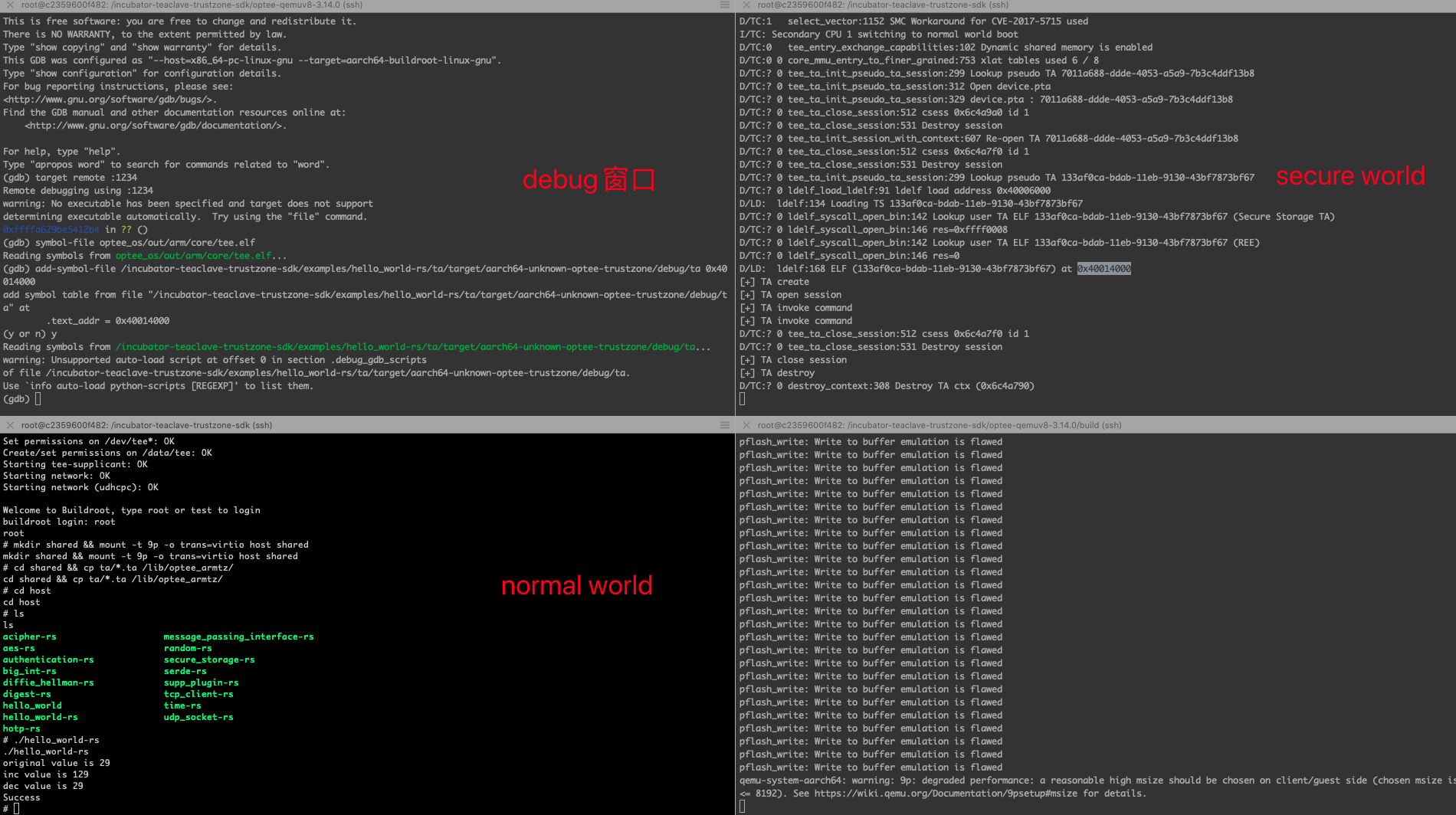
(gdb) b open_session

QEMU 执行示意图

Teaclave TrustZone SDK 示例 hello_world-rs 剖析

hello_world-rs 目录结构

├── Makefile
├── host
│   ├── Cargo.lock
│   ├── Cargo.toml
│   ├── Makefile
│   └── src
│   └── main.rs
├── proto
│   ├── Cargo.toml
│   ├── build.rs
│   └── src
│   └── lib.rs
├── ta
│   ├── Cargo.lock
│   ├── Cargo.toml
│   ├── Makefile
│   ├── Xargo.toml
│   ├── build.rs
│   ├── src
│   │   └── main.rs
│   ├── ta_aarch64.lds
│   ├── ta_arm.lds
│   └── ta_static.rs
└── uuid.txt

  • host 文件夹中存放的是普通世界的 untrusted code
    • host/src/main.rshello_world-rs 应用程序执行的入口,Cargo.toml 描述了 host 部分的依赖, Cargo.lock 中包含了依赖项的完整信息,Makefile 定义了 host 部分的编译信息。
  • ta 文件夹中存放的是安全世界中的 trusted code
    • 相比较 hostta 文件夹中多了以下文件:Xargo.toml 是 TA 的交叉编译文件 ,ta_aarch64.ldsta_arm.lds 分别定义了在 64 位架构和 32 位架构下 teaclave trustzone sdk 应用程序各部分在程序地址空间内的布局;ta_static.rs 定义了 TA 中的静态数据信息。
  • proto 文件夹中存放的是 CA (Client Application) 和 TA (Trusted Application) 共享的数据结构,并承担着解析 uuid.txt 提取 UUID 的任务。
  • uuid.txt 文件中记录的是 TA 的 UUID,是每个 TA 独一无二的身份标识。

hello_world-rs 重要代码文件解析

  • host/src/main.rs

进入 main 函数,首先调用 Context::new 函数建立起 hello_world-rs CA 和 TA 的逻辑联系,ctx 指向类型为 Context 的变量的地址,用于 CA 和 TA 的连接和通信。

let mut ctx = Context::new()?;

调用 open_session 在 CA 和对应的 TA 中打开一个 session,并将 hello_world-rs 的 UUID 作为参数传入,用于指引 CA 连接对应 UUID 值的 TA。

let uuid = Uuid::parse_str(UUID).unwrap();
let mut session = ctx.open_session(uuid)?;

&mut session 作为参数传入 hello_world 函数中。

hello_world(&mut session)?;

进入到 hello_world 函数中,首先将要进行运算的 u32 操作数用 ParamValue 类型包装为操作数 p0,设置其值为29,类型为 ValueInout,表示同时作为输入参数和返回值。

let p0 = ParamValue::new(29, 0, ParamType::ValueInout);

operation 用于保存 CA 要传递给 TA 的参数信息,第一个参数一般保留为 0,由于这里只有一个要传递的参数 p0,其他参数都保留为 ParamNone

let mut operation = Operation::new(0, p0, ParamNone, ParamNone, ParamNone);

CA 端使用获取到的 session, command_id 和要传递的参数 operation 调用 invoke_command 执行特定的 command,该操作将会切换到安全世界。

session.invoke_command(Command::IncValue as u32, &mut operation)?;
  • ta/src/main.rs

ta/src/main.rs 中的 invoke_command 函数参数与 host 中调用的 invoke_command 略有不同,第二个参数是 Paramters 类型。当数据从 CA 传递到 TA 时,实际上执行的是按 bit 的复制操作,所以 params 中的数据就是从 operation 中传递过来的数据.

fn invoke_command(cmd_id: u32, params: &mut Parameters) -> Result<()> {

valuesparams 取出要操作的 u32 值,match 表达式根据传入的参数 cmd_id 匹配对应的操作。在下面的代码中,如果匹配到 Command::IncValue,就对 values 中的 u32 值执行 +100 的操作;如果匹配到 Command::DecValue,就执行 -100 的操作;如果匹配到其他值,就直接返回错误参数的错误类型。

fn invoke_command(cmd_id: u32, params: &mut Parameters) -> Result<()> {
trace_println!("[+] TA invoke command");
let mut values = unsafe { params.0.as_value().unwrap() };
match Command::from(cmd_id) {
Command::IncValue => {
values.set_a(values.a() + 100);
Ok(())
}
Command::DecValue => {
values.set_a(values.a() - 100);
Ok(())
}
_ => Err(Error::new(ErrorKind::BadParameters)),
}
}
  • proto/src/lib.rs

lib.rs 中的枚举变量 Command 声明是开发者要实现的命令。

pub enum Command {
IncValue,
DecValue,
Unknown,
}

编译之后的 hello_world-rs 代码目录

编译之后的代码目录如下所示,这里省略了 release 文件夹下的内容。

├── Makefile
├── host
│   ├── Cargo.lock
│   ├── Cargo.toml
│   ├── Makefile
│   ├── src
│   │   └── main.rs
│   └── target #[generate]
│   ├── aarch64-unknown-linux-gnu #[generate]
│   │   └── release #[generate]
│   └── release #[generate]
├── proto
│   ├── Cargo.lock
│   ├── Cargo.toml
│   ├── build.rs
│   ├── src
│   │   └── lib.rs
│   └── target #[generate]
│   └── rls #[generate]
│   └── debug #[generate]
├── ta
│   ├── Cargo.lock
│   ├── Cargo.toml
│   ├── Makefile
│   ├── Xargo.toml
│   ├── build.rs
│   ├── src
│   │   └── main.rs
│   ├── ta_aarch64.lds
│   ├── ta_arm.lds
│   ├── ta_static.rs
│   └── target #[generate]
│   ├── aarch64-unknown-optee-trustzone #[generate]
│   │   └── release #[generate]
│   └── release #[generate]
└── uuid.txt

hello_world-rs 编译过程更类似于 Rust 程序编译。

  • 编译不可信部分 host 文件夹,生成 hello_world-rs 可执行文件;
  • 交叉编译可信部分 ta 文件夹,再用 UUID 和密钥进行签名,生成 UUID.ta 可执行文件。
  • 在执行时,hello_world-rsUUID.ta 验证通过后调用执行。

开发者如何开发自己的 Teaclave TrustZone SDK 应用程序

和前面介绍过的 使用 TEACLAVE SGX SDK 开发 SGX 应用 相似,这里也同样通过对 Teaclave TrustZone SDK 示例程序 hello_world-rs 进行改写来介绍如何构造自己的 Teaclave TrustZone SDK。

需要注意的是,Teaclave TrustZone SDK 是通过 UUID 唯一标识系统中的 TA,UUID 值不能重复,所以我们首先需要通过 ITU-T UUID generator 网站申请属于自己的唯一的 UUID,并将 uuid.rs 文件中的内容修改为新得到的 UUID 值。

1487a406-160d-4641-957e-66292f8d1309

假设开发目标是为两个 u8 数组求得交集和并集,也就是要实现交集函数 Intersection 和并集函数 Union 两个功能函数。

proto/lib.rs 进行修改,将 Command 中的成员替换为待实现的 IntersectionUnion

pub enum Command {
Intersection,
Union,
Unknown,
}

impl From<u32> for Command {
#[inline]
fn from(value: u32) -> Command {
match value {
0 => Command::Intersection,
1 => Command::Union,
_ => Command::Unknown,
}
}
}

接着,进入 host/src/main.rs 中的 main 函数,添加进行数据计算的函数,将用于与 TA 通信的 session 内存地址作为参数传递到 data_compute 中。

data_compute(&mut session)?;

data_compute 中,首先声明要进行数据处理的两个 u8 数组 nums1nums2,以及用于存储数据处理结果的 resu。在示例代码 hello_world 中的变量声明使用的是 ParamValue,但这里我们需要访问数组,一段连续的内存变量而非变量。通过阅读 Teaclave TrustZone SDK client 端的 Rust 仓库 Crate optee_teec,可知 ParamTmpRef 用于定义临时内存访问。于是将这三个数组地址作为参数新建 ParamTmpRef 类型,并将 ParamTmpRef 类型变量传递到 operation 中,用于传递给 TA 交互信息。

在准备好与 TA 交互的信息后,调用 invoke_command 通知对应的 TA 执行 Command::Intersection 指定的操作。

// in host/src/main.rs
fn data_compute(session: &mut Session) -> optee_teec::Result<()> {
let nums1:[u8; 5] = [1, 2, 3, 4, 5];
let nums2:[u8; 5] = [4, 5, 6, 7, 8];
let mut resu = vec![0; 10];

let p1 = ParamTmpRef::new_input(&nums1);
let p2 = ParamTmpRef::new_input(&nums2);
let p3 = ParamTmpRef::new_output(&mut resu);
let mut operation = Operation::new(0, p1, p2, p3, ParamNone);

println!("intersection invoke");
session.invoke_command(Command::Intersection as u32, &mut operation)?;
}

invoke_command 函数的具体实现在 ta/sec/main.rs 文件中的 invoke_command。共享的参数通过 params 从 CA 传递到 TA 中, 同样,可以根据 TA 端的 Rust 仓库 optee_utee 提供的接口函数抽丝剥茧般地提取出来 ParamMemref 类型的 nums1, nums2vec_resu

    let nums1 = unsafe { params.0.as_memref().unwrap().raw() };
let nums2 = unsafe { params.1.as_memref().unwrap().raw() };
let mut vec_resu = unsafe { params.2.as_memref().unwrap().raw() };

let nums1_size = unsafe { (*nums1).size };
let nums2_size = unsafe { (*nums2).size };

现在,进入 match 表达式中,将 Command::from 的枚举修改为 Command::IntersectionCommand::Union。要实现的函数就填充到对应的分支括号中。

  match Command::from(cmd_id) {
Command::Intersection => {
Ok(())
}
Command::Union => {
Ok(())
}

下面的示例代码实现的是求两个数组之间的交集元素。具体的实现是通过一个额外的散列集 set,记录 nums1 中的所有元素,然后对 nums2 中的元素进行遍历,如果 nums2 中的元素也出现在了 set 中,那么该元素为 nums1nums2 共有,是交集元素,写入结果向量 vec_resu 中,并移除掉 set 中的该元素。最后,将结果向量的 size 修改为共有的交集元素的个数。其中,要读取 nums1nums2 数组中的元素,还需要解引用 ParamMemref 类型的指针读取出指向元素值的 buffer 指针地址,再使用 offset 偏移指针从而读出 nums1nums2 的值。

      let mut set: HashSet<u8> = HashSet::new();
let mut vec_count = 0;
for i in 0..nums1_size {
let mut val_nums1 = 0;
unsafe {
val_nums1 = *((*nums1).buffer as *mut u8).offset(i as isize);
};
set.insert(val_nums1);
}

for i in 0..nums2_size {
let mut val_nums2 = 0;
unsafe {
val_nums2 = *((*nums2).buffer as *mut u8).offset(i as isize);
};

if set.contains(&val_nums2) {
unsafe { *((*vec_resu).buffer as *mut u8).offset(vec_count as isize) = val_nums2; }
vec_count += 1;
set.remove(&val_nums2);
}
}
unsafe{ (*vec_resu).size = vec_count; }

对于 Union 函数的实现,同样是利用一个额外的散列集 set,记录 nums1 中的所有元素,并直接将 nums1 中的元素写入结果向量 vec_resu 中,而后再依次读取 nums2 中的元素,如果该元素没有在 set 中出现,则写入结果向量 vec_resu 和散列集 set 中。

      let mut set: HashSet<u8> = HashSet::new();
let mut vec_count = 0;
for i in 0..nums1_size {
let mut val_nums1 = 0;
unsafe {
val_nums1 = *((*nums1).buffer as *mut u8).offset(i as isize);
*((*vec_resu).buffer as *mut u8).offset(vec_count as isize) = val_nums1;
}
vec_count += 1;
set.insert(val_nums1);
}

for i in 0..nums2_size {
let mut val_nums2 = 0;
unsafe {
val_nums2 = *((*nums2).buffer as *mut u8).offset(i as isize);
};

if !set.contains(&val_nums2) {
unsafe { *((*vec_resu).buffer as *mut u8).offset(vec_count as isize) = val_nums2; }
vec_count += 1;
set.insert(val_nums2);
}
}
unsafe{ (*vec_resu).size = vec_count; }

回到 host/src/main.rs,通过 updated_size 函数读取到在 ta/src/main.rs 中对 vec_resu 新设置的 size 值,也就是 nums1nums2 共有的元素的个数,最后打印出结果向量 resu 的值。

    // in data_compute function
let updated_size = operation.parameters().2.updated_size();
println!("Intersection resu = {:?}", &resu[..updated_size]);

这样,我们就基于 Teaclave TrustZone SDK 提供的示例代码实现了自己的求交集和并集函数。

总结

本文首先介绍 Teaclave TrustZone SDK 项目的环境配置过程,然后介绍了简单示例 hello_world-rs 的组织结构和编译过程 ,最后,通过修改 hello_world-rs 实现 intersectionunion 函数为例,介绍如何基于提供的 SampleCode 进行 Teaclave TrustZone SDK 应用程序的开发。

延伸阅读
Teaclave Meetup #8

Mingshen Sun

Agenda

  • Recent update in Teaclave — Mingshen Sun
  • Using and Customizing Teaclave SGX SDK — Shunfan Zhou

Notes

Recent Update in Teaclave — Mingshen

Platform

  • [docker] start Teaclave docker services with auto-detection mechanism (#559).
  • Use run-teaclave-service.sh instead of using docker-compose directly.

SGX SDK

TrustZone SDK

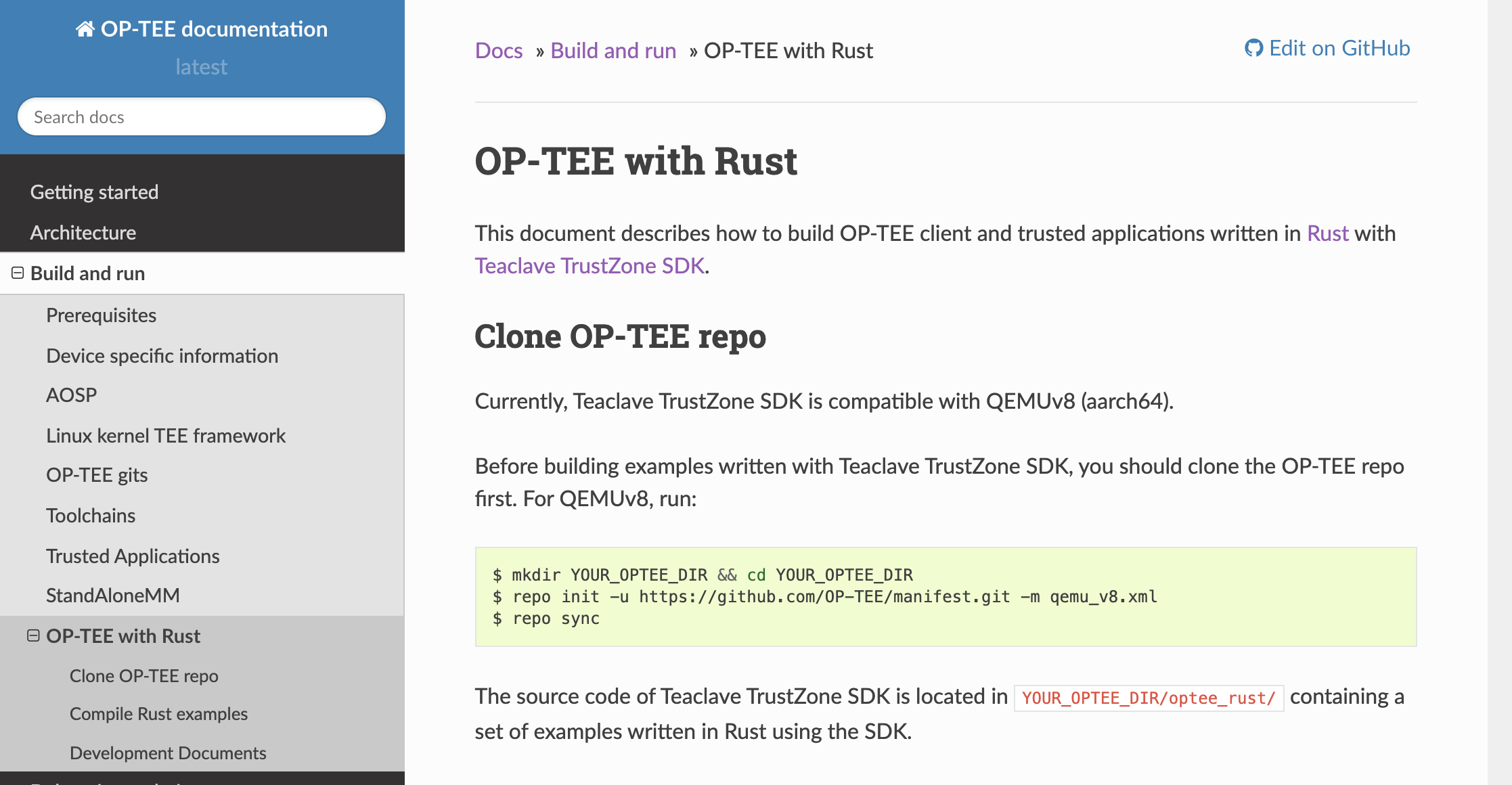
OP-TEE with Rust

Website

Project Powered By Teaclave

Teaclave TrustZone SDK Links in Homepage

Community

  • New committers: Yuan Zhuang and Rong Fan from Baidu
  • Discord: Connect directly with Teaclave community members (join link: https://discord.gg/ynECXsxm5P)

Security

  • SmashEx: Smashing SGX Enclaves Using Exceptions (to appear at CCS 2021): Jinhua Cui (National University of Defense Technology, National University of Singapore); Zhijingcheng Yu (National University of Singapore); Shweta Shinde (ETH Zurich); Prateek Saxena (National University of Singapore); Zhiping Cai (National University of Defense Technology)
  • https://arxiv.org/ftp/arxiv/papers/2110/2110.06657.pdf
  • CVE-2021-0186
    • https://www.intel.com/content/www/us/en/security-center/advisory/intel-sa-00548.html
    • Description: Improper input validation in the Intel(R) SGX SDK applications compiled for SGX2 enabled processors may allow a privileged user to potentially escalation of privilege via local access.
    • Affected Products: Intel SGX SDK for Windows v2.12 and earlier, Intel SGX SDK for Linux v2.13 and earlier, Intel® Processors supporting SGX2.
    • Intel recommends updating the Intel® SGX SDK to the versions listed below. Enclaves built with the new Intel® SGX SDK version should increment the value of their ISVSVN field.
  • Patch: https://github.com/intel/linux-sgx/commit/edfe42a517b3e4b1d81204c3cdef6da6cb35fefc

Patch in Intel SGX SDK

Using and Customizing Teaclave SGX SDK — Shunfan Zhou

  • Teaclave SGX SDK
    • pro: security
    • con: testing is hard
  • Case study: rust-bitcoin
    • std
    • Feature
    • Port dependencies recursively
  • Some issues
    • efforts of porting
    • security: 1) updates of upstream, 2) unit tests
    • More TEE backend: AMD SEV, ARM CCA
  • libs is not completed in SGX for vanilla Rust standard library
  • Phala libc-hacks
    • directly use Intel's libc
    • use ocall warpper functions
  • Conflicts: multiple language items in Rust
  • Runtime behavior checks
  • HW mode issue: rand::thread_rnd() is using CPUID, which is not allowed in SGX
  • Check instructions after compiling

Free Discussion

Attendees

  • Mingshen Sun
  • Qinkun Bao
  • He Sun
  • George
  • Hongbo Chen
  • hang
  • Kevin
  • Ben
  • Ruide
  • Rudong Zhou
  • shelven
  • Tongxin Li
  • Weijie Liu
  • Zha0Chan
  • Tianyi Li
  • DuanRan
  • Gordon
  • david

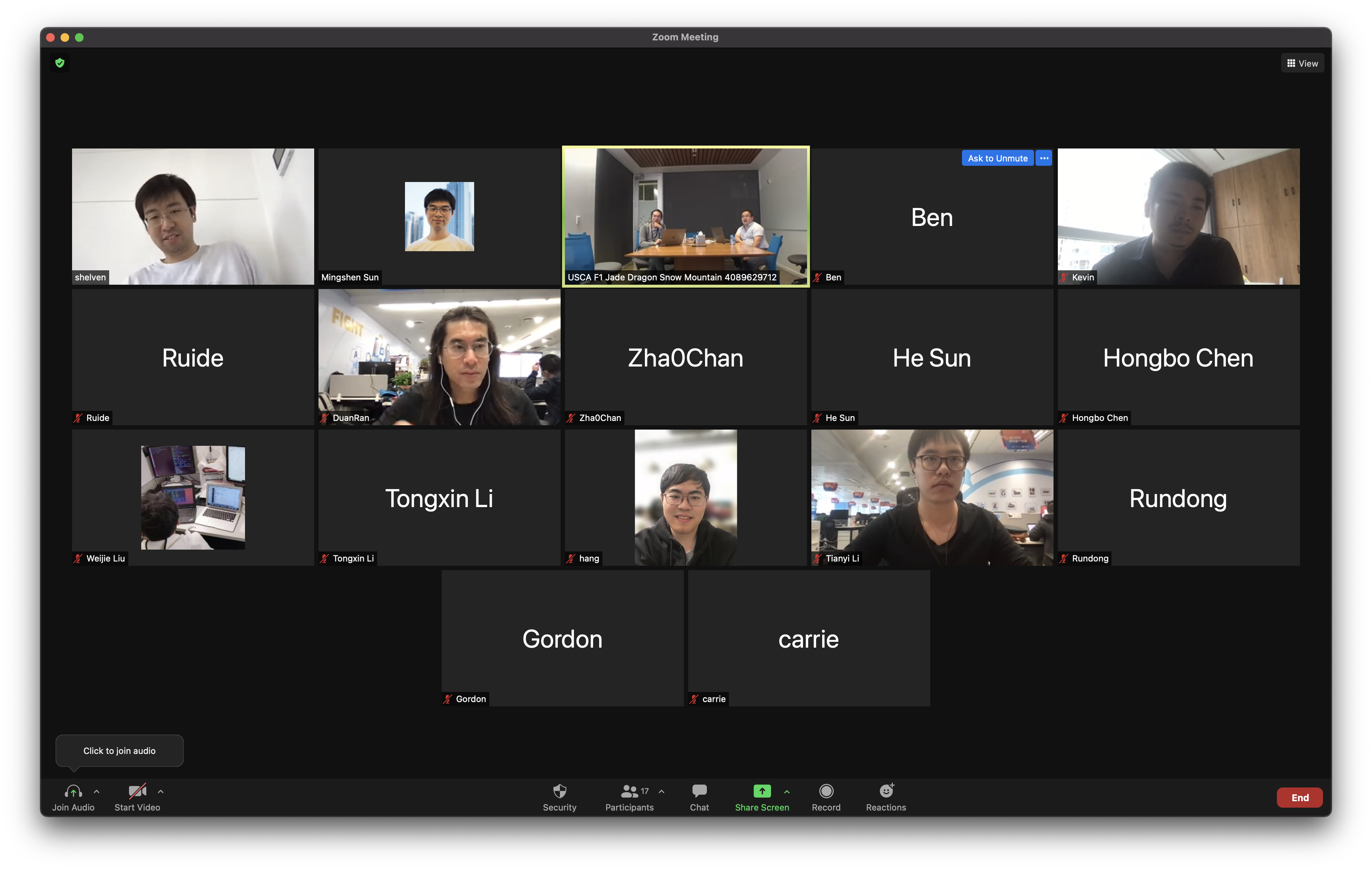
Group Photo

Group Photo

Announcing Apache Teaclave™ (incubating) 0.3.0

Mingshen Sun

On behalf of the Teaclave community, I am happy to announce the third Apache Incubator release of Teaclave, 0.3.0. Teaclave is a universal secure computing platform, making computation on privacy-sensitive data safe and simple. Apache Teaclave™ (including the FaaS platform, SGX SDK, and TrustZone SDK) is being used and contributed by developers from many organizations and other open source projects. Please see the powered by page to learn more.

This is the third official Apache Incubator release. In this release, we focus more on bringing WebAssembly into Teaclave. Now, you can run functions written in different languages in Teaclave with the WebAssembly executor. Specifically, we modify WebAssembly Micro Runtime and add it as a new executor in Teaclave.

Highlights

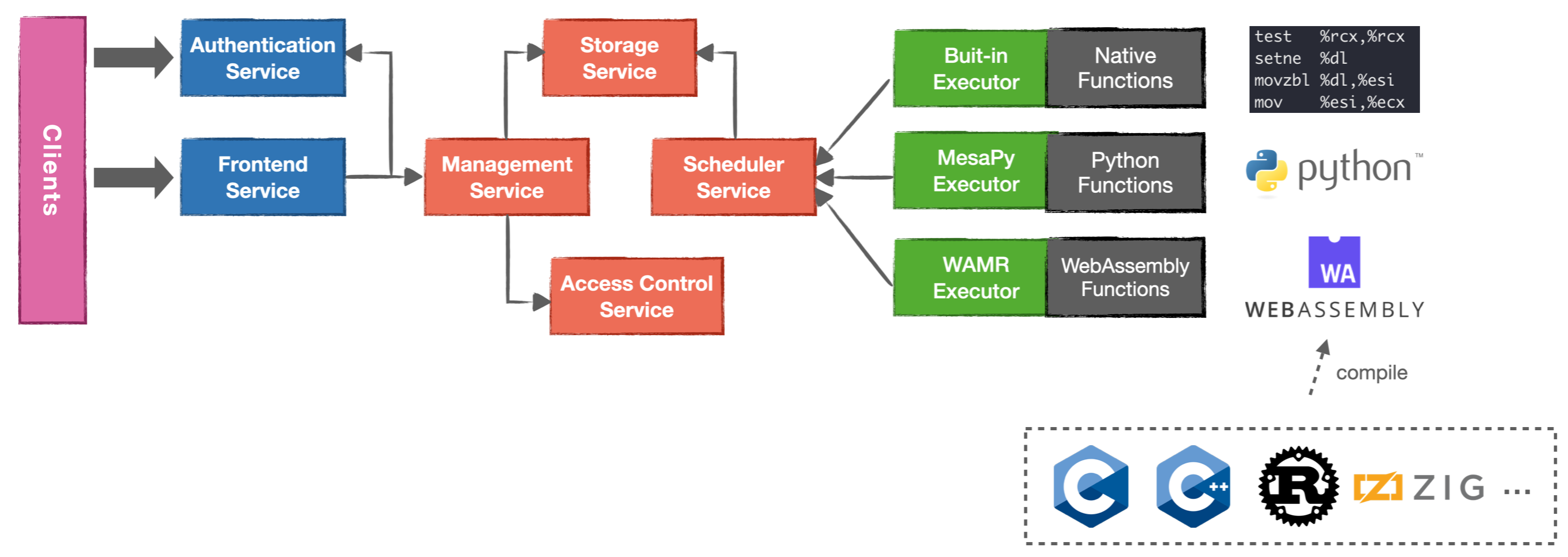
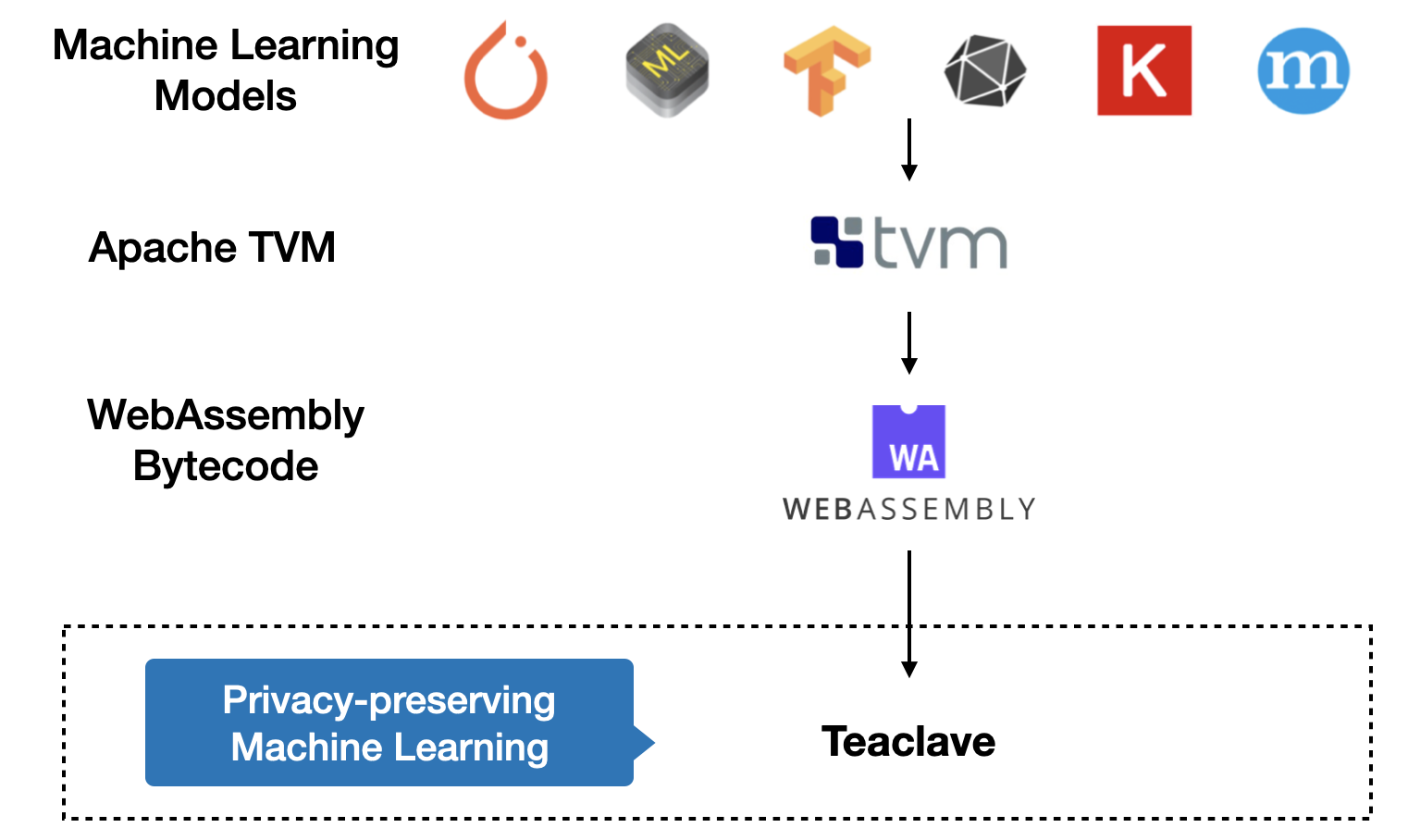
In this release, we added a new WebAssembly executor which supports to run function in the WebAssembly bytecode. Therefore, in addition to native code and Python scripts, Teaclave can run many other languages which can be compiled in to WebAssembly. This enables a lot of functions of privacy-preseving computation that are not easily rewritten in Rust or Python. Furthermore, because of the ecosystem of WebAssembly, we can even run deep neural network models in the WebAssembly executor.

Teaclave Function Executors

To illustrate the capability of the executor, we also support WebAssembly machine learning models compiled by Apache TVM. Apache TVM is an open source machine learning compiler framework for CPUs, GPUs, and machine learning accelerators. TVM also supports WebAssembly runtime backend. We also introduce a new MNIST inference example to show the usage of the new executor with TVM.

Using the WebAssembly executor for Machine Learning Inference with TVM

0.3.0 Release Notes

Here is a list of notable changes in Teaclave version 0.3.0.

Features

  • Add the WebAssembly executor to support functions written in other languages.
  • Examples of running C and Rust with the WebAssembly executor.
  • Support inference tasks with models compiled by TVM.
  • Add the MNIST inference example to demonstrate the ability of using TVM in Teaclave.

Enhancements

  • Add the script to simplify developing with editors with Rust's Language Server Protocol support.
  • Upgrade SGX SDK dependencies, i.e., Intel SGX SDK to version 2.14.100.2, DCAP to version 1.11.100.2.

Bug Fixes

  • Update the SGX SDK used in the runtime dockerfile.
  • Fix Python.h not found when compiling acs_py_enclave.c.
  • Fix building system messed up by untracked Cargo.lock files.
  • Fix dcap building issue.

Docs

Download

Teaclave 0.3.0 can be downloaded at the download page. Note that it is essential to verify the integrity of the downloaded file using the PGP signature (the .asc file) or a hash (the .sha256 file).

Documentation

If it is the first time to try Teaclave, we provide a simple but clear tutorial to guide you getting stated with Teaclave by invoking your first function in Teaclave.

Basically, you can build the Teaclave platform using docker with these commands:

$ tar zxvf apache-teaclave-0.3.0-incubating.tar.gz && cd \
apache-teaclave-0.3.0-incubating
$ # Instructions to verify the source tar: https://teaclave.apache.org/download/#verify-the-integrity-of-the-files

$ docker run --rm -v $(pwd):/teaclave -w /teaclave \
-it teaclave/teaclave-build-ubuntu-1804-sgx-2.14:latest \
bash -c ". /root/.cargo/env && \
. /opt/sgxsdk/environment && \
mkdir -p build && cd build && \
cmake -DTEST_MODE=ON -DSGX_SIM_MODE=ON -DGIT_SUBMODULE=OFF .. && \
make"

Launch all services with docker-compose using simulation mode:

$ (cd docker && docker-compose -f docker-compose-ubuntu-1804-sgx-sim-mode.yml up --build)

And invoke function with a Python client:

$ cd examples/python
$ PYTHONPATH=../../sdk/python python3 builtin_echo.py 'Hello, Teaclave!'
[+] registering user
[+] login
[+] registering function
[+] creating task
[+] approving task
[+] invoking task
[+] getting result
[+] done
[+] function return: b'Hello, Teaclave!'

If you want to understand the internals of Teaclave, we provide several documents about the design of Teaclave. Also, we extensively document our codebase in each sub directories. At last, API references are automatically generated and uploaded to our homepage.

Community

Teaclave Meetup #7

Mingshen Sun

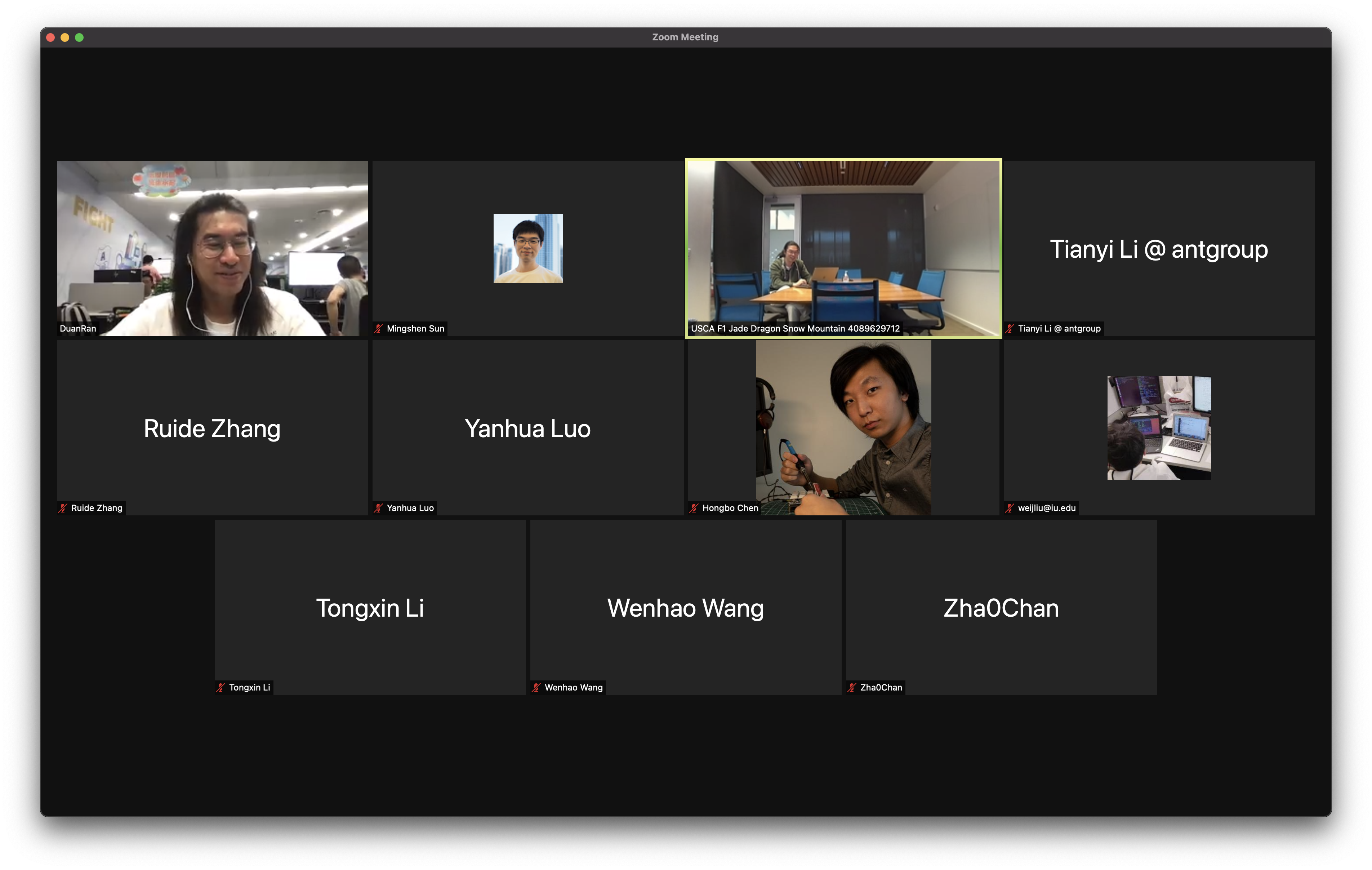
In Aug 26, we gathered on Zoom for the 7th Teaclave meetup. In this meetup, Mingshen briefly introduce recent updates in Teaclave, and also introduce new members attending the meetup.

For all Teaclave events, we publish a Teaclave Community Event Calendar: https://calendar.google.com/calendar/u/0/embed?src=l1q5osem2br8i4bj7dgik5sae4@group.calendar.google.com. You can subscribe to see our latest schedule information including the Zoom link.

Here is the minutes for Teaclave Meetup #7 on Aug 26, 2021.

Attendees

  • Mingshen Sun
  • Ran Duan
  • Tianyi Li
  • Ruide Zhang
  • Yanhua Luo
  • Hongbo Chen
  • Weijie Liu
  • Tongxin Li
  • Wenhao Wang
  • Chan Zhao

Agenda

  • Recent updates in Teaclave - Mingshen Sun
  • Free discussion

Notes

Recent updates in Teaclave - Mingshen

Teaclave Faas Platform

Teaclave TrustZone SDK

  • TEE Socket APIs and examples
  • Upgrade building docker to Ubuntu 20.04
  • Switch to GitHub Actions
  • Add -rs to examples and update test scripts (#34)
  • Update to OP-TEE 3.14.0 (#35)

Teaclave SGX SDK

  • Intel SGX SDK 2.14

Website

External Collaboration

  • Teaclave/Intel: Integrating Graphene as a new Library OS executor
  • Teaclave/OP-TEE: Integrating examples in Rust TrustZone SDK in OP-TEE

Free Discussion

Intro

  • New members: Tianyi Li from Ant Group, Wenhao Wang from CAS

About Occlum NGO

Group Photos

Teaclave Meetup #7